

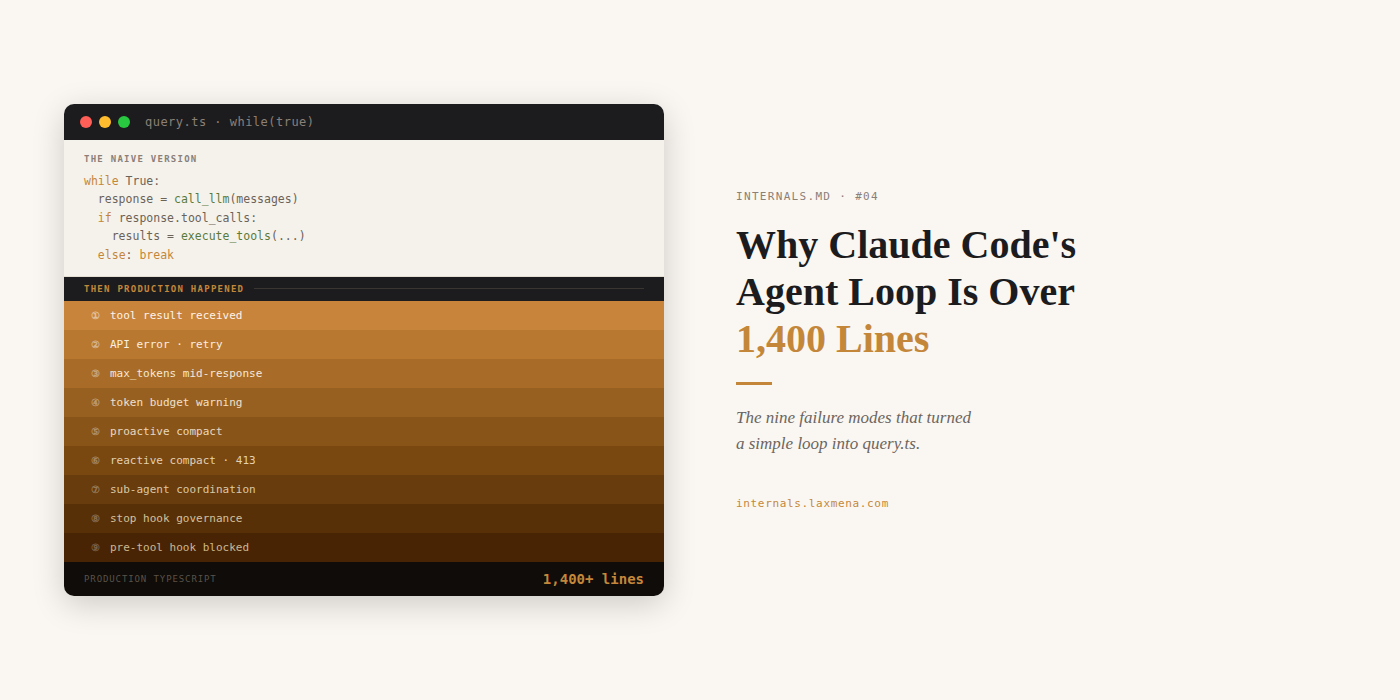
When you type a prompt in Claude Code, a loop starts. Nine conditions can keep it running automatically, without asking you for input. Most of them have nothing to do with whether your task is finished.
The loop lives in query.ts, Claude Code’s core agent logic file, exposed via an npm source map in March 2026 and since analyzed by several engineers in the community. One while(true) spanning over 1,400 lines of production TypeScript.
This post opens that loop.
A note on sources. The implementation details here are based on the Claude Code v2.1.88 source, exposed via an npm source map in March 2026. query.ts is not publicly documented. Everything in this post is community analysis, cross-referenced against the official Claude Code docs. Anthropic ships frequently, so the architecture is stable but specific line numbers are not.
The Blueprint:
Start here: the naive version, and what breaks it
The architecture: why an async generator, why single-threaded, and what the choice costs
Before you type anything: what loads at session start and what it spends
The nine conditions: each failure mode that grew the loop past 1,400 lines
Start here: the naive version
Every agent tutorial gives you this:
while True:
    response = call_llm(messages)
    if response.tool_calls:
        results = execute_tools(response.tool_calls)
        messages.append(results)
    else:
        break
While that 'naive' approach works fine in a controlled demo - where the API is stable and the task is trivial, it hits a wall the moment it encounters the messy reality of production - where network jitter is a given and long-running scripts have a habit of hanging indefinitely.
Then production happens. The API times out mid-response. The context window fills after 20 tool calls. A bash script hangs with no exit condition and freezes the terminal. A governance hook needs to review the output before the session ends. The laptop sleeps. The session is gone.
Each of those is a line in query.ts. The production version handles all of them. The rest of this post explains how.
The loop is not the smart part
Worth stating before anything else.
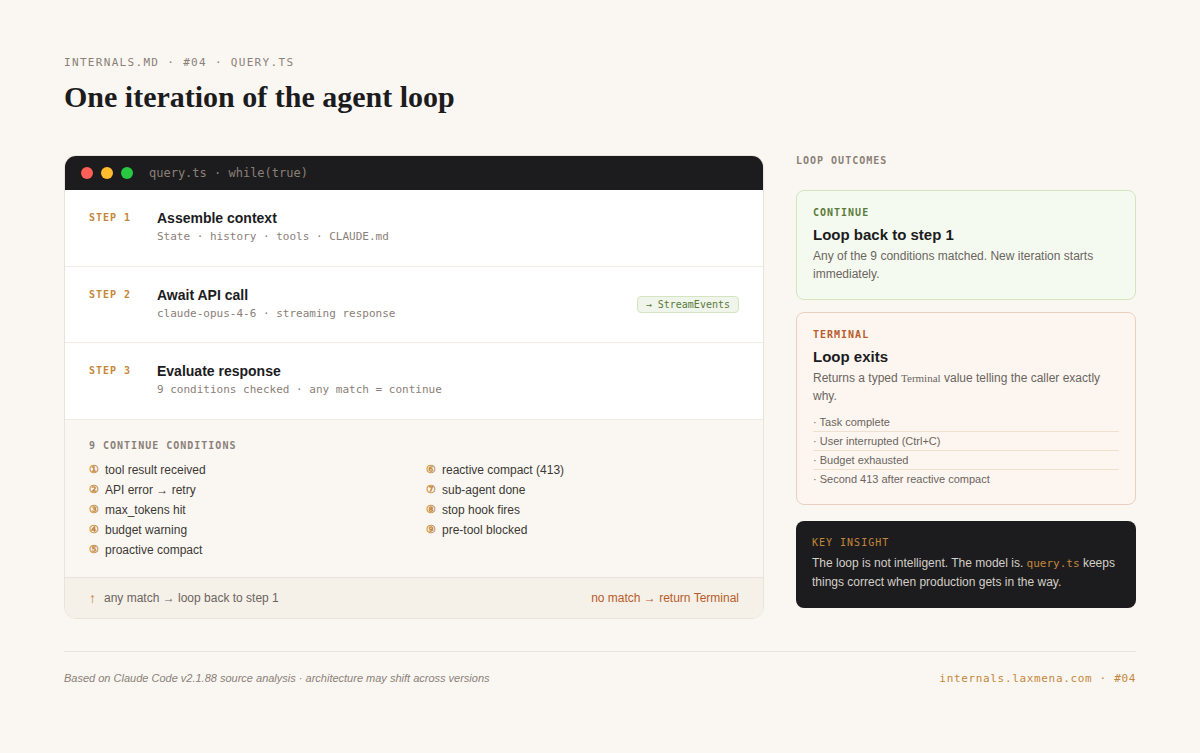
query.ts is a state machine. It calls an API, reads the response, executes whatever tools the model requested, feeds the results back, and calls the API again. The intelligence is entirely in the model. The loop keeps things correct when production introduces conditions the model cannot handle on its own.
That framing matters for every design decision that follows.
The architecture
Claude Code is built on a JavaScript runtime (Bun, per the v2.1.88 source analysis) with TypeScript in strict mode. The UI is Ink, a React implementation that renders to terminal cells. The agent logic lives in query.ts.
The loop is declared as an async generator:
export async function* query(
  params: QueryParams,
): AsyncGenerator<
  | StreamEvent
  | RequestStartEvent
  | Message
  | TombstoneMessage
  | ToolUseSummaryMessage,
  Terminal
>
Two decisions are embedded in this signature.
Typed events, not buffered output. The loop yields events as they happen: text tokens, tool calls, tool results, compaction markers. Each one renders to the terminal immediately. The result is that the user sees output character by character, with no buffering between the API and the screen.
A typed exit reason. The loop returns Terminal, not void. When it exits, it tells the caller exactly why: task complete, context limit hit, user interrupted, budget exhausted. Session recovery, Remote Control reconnection, and resume behavior all depend on this.
The loop is single-threaded: one instance, one thread, one loop. There is no shared mutable state between concurrent operations, no locks, and no race conditions within a session.
This is a deliberate bet. Parallelism adds throughput, but it also adds shared state between concurrent tool executions. Shared state introduces a class of bugs that single-threaded designs cannot have.
Ultimately, Anthropic favored a design that prioritizes deterministic, single-threaded correctness over the throughput gains you might get from aggressive parallel execution.
The cost of that bet is specific. A bash tool that runs a tight loop, a synchronous operation that blocks for minutes, a script with no exit condition: none of these can be interrupted from within the loop. The event loop freezes until the operation completes or the user hits Ctrl+C. That is the production risk this architecture accepts.
↓ INTERNALS: Architectural Tradeoffs 1
Early versions of Claude Code used recursion. The query function called itself. In long sessions with hundreds of tool calls, the call stack grew until it exploded. The current design carries mutable state in a
Stateobject between iterations. Eachcontinueis a state transition, and atransitionfield records the reason, so error recovery and compaction logic know what happened in the previous turn.
↓ INTERNALS: Architectural Tradeoffs 2
The async model is cooperative multitasking, not preemptive. Tasks yield control voluntarily at
awaitandyieldpoints. While the loop waits on an API response, the same thread handles terminal rendering, keypress events, and JSONL session writes. Nothing runs simultaneously; everything is interleaved. This keeps the terminal responsive even during long tool executions.
Before you type anything
Before you ever see a prompt cursor, Claude Code performs a complex ten-step initialization.
It loads settings in a specific priority hierarchy with managed policies acting as the immutable overrides, followed by a recursive walk up your directory tree to hunt for project-level rules, memory files, and MCP configurations.
Only after aggregating all that state does it finally assemble the system prompt.
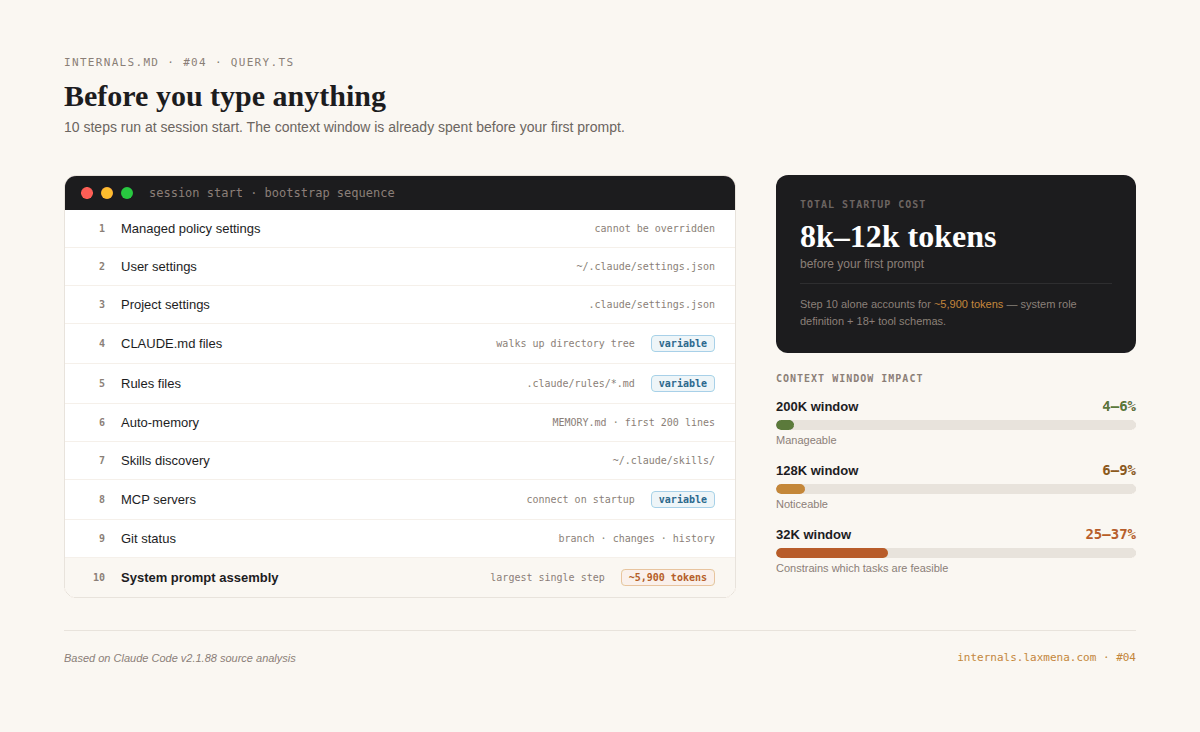
The cost before you type a single character: approximately 8,000 to 12,000 tokens. On a 200K context window that is 4 to 6%. On a 32K window it is 25 to 37%, which constrains what tasks are feasible before the first token of actual work.
One detail worth noting: CLAUDE.md injects as a user message, not part of the system prompt. The model treats system prompt content as configuration and user message content as context. That distinction affects how strictly it follows CLAUDE.md instructions.
↓ INTERNALS
The system prompt is not a single string. Claude Code assembles it from conditional fragments based on your environment, settings, and active context. The base system role definition is approximately 2,900 tokens. Tool definitions add roughly 3,000 more for 18+ tools. CLAUDE.md content adds between 500 and 2,000. The assembled prompt is a dense technical document: behavioral rules, tool usage philosophy, coding style guidelines. The line “three similar lines of code is better than a premature abstraction” is stated in the system prompt. This is the model’s operating manual.
Two models, one pipeline
Every reasoning turn runs on an Opus-class model (claude-opus-4-6 per the v2.1.88 analysis, though this may shift across versions). Opus sees the full system prompt, the complete tool catalog, and the conversation history. It decides what to do next.
A smaller, faster model handles exactly two background tasks.
A warmup request fires at session start: one intentionally truncated API call with stop_reason: max_tokens. The response content is irrelevant. This is a health check, verifying the API is reachable and the quota is valid.
File path extraction runs after bash commands produce output, identifying which file paths appear in the results. The prompt is concise and single-purpose (179 words in v2.1.88).
Every reasoning turn goes through Opus. The smaller model handles only those two tasks.
↓ INTERNALS
Claude Code uses aggressive prompt caching. Content blocks carry
cache_controlbreakpoints. The first pass writes to a server-side cache at 1.25x input cost. Subsequent requests with matching prefixes pay approximately 10% of normal cost. In observed session traces, 90% or more of tokens per turn are served from cache. Without caching, the economics of long sessions would be brutal. Prompt caching is what makes the model feel like it “remembers” the session despite being stateless on every API call.
The nine conditions
The loop terminates when a terminal condition is met. Nine conditions cause it to run another iteration automatically, without asking the user. Each started as a bug report.
① Tool result received. The model calls a tool, which executes and injects its result back into context. The loop continues so the model can decide what to do with it. This is the core of the agentic pattern.
② API error or network failure. When the request fails, the loop retries with exponential backoff, up to 10 times. The user sees nothing.
③ Max output tokens mid-response. The model hit its output limit before finishing. The API signals this with stop_reason: max_tokens, and the loop continues to let it complete.
④ Token budget warning injected. As the session approaches the context limit, the loop injects a warning telling the model to start wrapping up, then continues so the model can actually read it.
⑤ Proactive compaction triggered. When context is full, one of four compaction strategies runs and the loop continues with the compressed result. The pipeline is covered in the next section.
⑥ Reactive compact after 413. The API rejected the request: context too large. The proactive strategies ran and were not enough. Reactive compact runs a full context collapse. The full mechanics are in the next section.
⑦ Sub-agent Task tool completes. When a child agent spawned via the Task tool finishes, the parent loop continues. Sub-agents are implemented as tools, so the parent loop cannot distinguish between waiting on a child agent and waiting on a file read. The tradeoff: the parent receives only a summary of the child’s work (estimated at 1,000 to 2,000 tokens in the source analysis), so intermediate steps and decisions inside the sub-agent are invisible to it.
⑧ Stop hook signals continue. When the model signals it is done, a user-defined stop hook can override that and keep the loop running. Stop hooks are a governance layer the model cannot override.
⑨ Pre-tool hook blocks execution. A hook intercepted a tool call before execution and denied it. The denial injects as a tool result. The loop continues so the model can reason about the denial.
The compaction pipeline
When the context window fills, the loop does not crash. It compacts.
Four proactive strategies run in order, cheapest first. Tool Result Budget truncates oversized tool outputs with no model call needed. Snip Compaction removes older tool results from history, also without generation. Microcompaction summarizes middle conversation turns one at a time using a scoped model call. Autocompact fires at a usage threshold, first attempting Session Memory Compaction (extracting key facts into a compact object) and falling back to full conversation compaction if that is not enough.
The ordering is not arbitrary. You exhaust the cheap options before paying for the expensive ones.
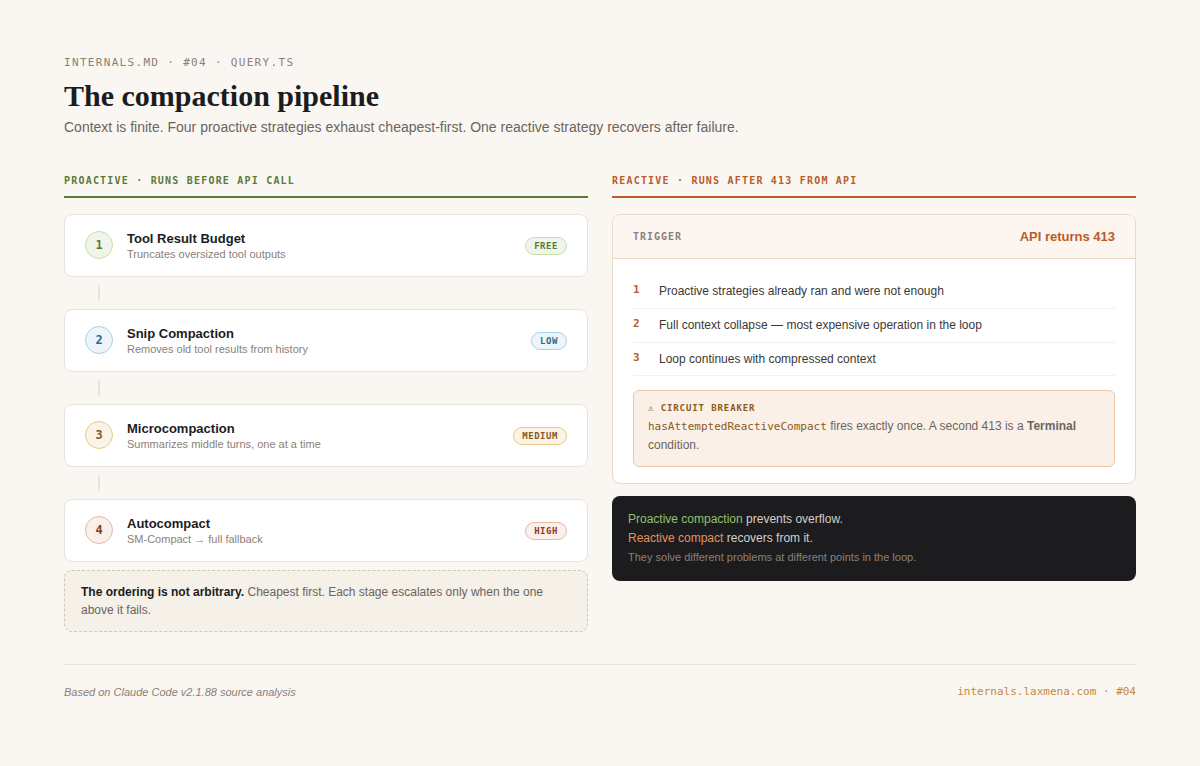
Reactive compact is separate. It fires only after the API returns 413, which means the proactive strategies have already run and were not enough. The loop collapses the full context and continues. The circuit breaker hasAttemptedReactiveCompact ensures this fires once only; a second 413 is a terminal condition.
Think of it as a two-stage safety system: proactive compaction keeps you under the limits during normal operation, while the reactive cycle acts as your emergency circuit breaker when things inevitably go sideways.
↓ INTERNALS
Sub-agents are context-efficient for a specific reason. A sub-agent runs its own full loop internally, potentially consuming 100K or more tokens on a complex task, then returns only a compact summary to the parent. The parent pays for the summary, not the full work. This is why the Task tool is the right primitive for parallelizing work in a single-threaded system: each sub-agent has its own isolated context window.
Session persistence
Every message, tool call, and result writes to a JSONL file under ~/.claude/projects/ in real time, as each event happens rather than at session end.
Three things depend on this.
claude --resume reconstructs exact conversation state at the point of interruption. --fork-session copies history into a new session at any chosen point, leaving the original unchanged. Remote Control reconnects automatically if the laptop sleeps and wakes, because session state is on disk rather than in memory.
The TombstoneMessage type in the generator signature connects to this log. When compaction removes messages, their tombstone stays in the JSONL so the replay log stays consistent after compression.
How other loops handle the same problems
The naive loop has none of the nine conditions. Context overflow crashes it. Network failures terminate it. It is the right starting point, not a production architecture.
Hermes Agent (Nous Research, MIT license) takes a different position on parallelism. When the model requests multiple tools, Hermes executes them through a thread pool rather than sequentially. The throughput gain is real. So is the exposure: two tools executing in parallel can write to the same file at the same time. Race conditions in tool output are a category of bugs that Claude Code’s single-threaded model cannot produce.
LangGraph is not an agent loop. It is a framework for constructing them. Human-in-the-loop pauses are explicit: interrupt() stops execution, Command(resume=value) continues it. Claude Code’s permission system is implicit, handled internally with no graph definition required. The explicit approach is more debuggable; the implicit one requires less setup. Hermes is model-agnostic across providers; Claude Code is tied to Anthropic’s API.
The loop is not the smart part of Claude Code. The model is.
query.ts exists to keep the model correct when production introduces conditions the model cannot handle on its own: lost connections, context limits, governance hooks, failed tool calls, slow networks.
Every line beyond that naive version exists because something failed in production.
If your agent loop is shorter, you have not hit those failures yet.
INTERNALS.md is a technical series on how production systems actually work. No tutorials. No framework evangelism. Just the layer beneath.
If this was useful, the best thing you can do is share it with one engineer who would care.
Sources
Claude Code official docs: how-claude-code-works, agent-sdk/agent-loop, remote-control, channels
Harrison Guo: Claude Code Deep Dive Part 2 — The 1,421-Line While Loop
Jonas Kim: Claude Code Architecture Analysis (v2.1.88 source analysis)
Zain Hasan: Inside Claude Code — An Architecture Deep Dive
Alex (AgenticLoops): Disassembling AI Agents Part 2 — Claude Code
VILA-Lab: Dive into Claude Code
Arize AI: How Hermes Implements an Open-Source Agent Harness Architecture
Ken Huang: Chapter 1 — The Harness Paradigm